


Between July and December, Flinders University will be upgrading eligible staff managed devices to Windows 11 to maintain a secure, supported and modern digital environment. The rollout will occur in stages, so not all staff devices will receive the upgrade at the same time.
What to expect
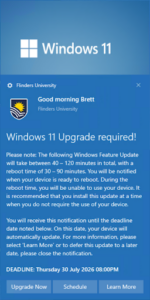
When your device is ready, you will receive a pop-up notification advising that the Windows 11 upgrade is available. This notification is the trigger to show that your device is ready to be upgraded.
From the notification, you can:
- Upgrade now and start the process immediately
- Schedule the upgrade for a time that suits you
- Learn more about Windows 11 and what to expect before upgrading.
You can also choose to complete the upgrade through Software Centre when it becomes available on your device.
Before you upgrade
To help ensure a smooth experience:
- Save your work before starting the upgrade
- Choose a time when you won’t need your device for up to two hours
- Consider starting the upgrade before a lunch break or other convenient downtime.
During the upgrade
The upgrade installs in the background, allowing you to continue working while it downloads and prepares. After approximately 20–60 minutes, your computer will require a restart to complete the installation. The restart process may take 30–90 minutes, depending on your device.
If you do not take action before the deadline shown in your notification, the upgrade will occur automatically on the scheduled date and time.
After the upgrade
Once the upgrade is complete, simply log back in and continue working as normal.
You’ll notice a refreshed look and feel, including updates to the Start menu, taskbar and settings experience. While the interface has been modernised, most everyday tasks work much the same way. You’ll also benefit from improved security and performance enhancements. Your files, applications and access to university systems will remain available following the upgrade.
Need more information?
Visit the Flinders Staff website and navigate to Workplace Support > Digital Services > Windows 11 for FAQs, upgrade guidance, key differences between Windows 10 and Windows 11, and support information.
Need help?
If you have any issues or questions, please contact the IDS Service Desk on (08) 8201 2345 or by submitting a request in Service One.
Key Points Summarised
- Eligible staff devices will be upgraded to Windows 11 in stages
- You’ll receive a notification when your device is ready
- You can upgrade immediately or schedule a convenient time
- Allow up to two hours for the upgrade and restart process
- Your files, applications and access to university systems will remain available after the upgrade
- If you take no action, the upgrade will be installed automatically before the deadline shown in your notification