


Our Getting Off To A Good Start Guide is a collection of tips and advice for new or returning students who want to start the year as best they can. Originally a print guide, it is now a series of interlinked blog posts that you can bookmark and return to at any point and resume reading. Living online, the guide is constantly updated. This section deals with learning your way around campus and online.
Getting Off to a Good Start Guide
✨ Explore the sections:
🔗 Introduction |
🔗 Know Your Way Around |
🔗 Start Your Studies Well |
🔗 Looking After Yourself |
🔗 Your Support System |
🔗 Further Reading |
🔗 Final Words
The modern university experience involves both physical and digital spaces.
If you are attending a campus (or multiple campuses) for lectures and tutorials, make sure to visit those campuses before the university year starts so you know where your lecture rooms and classes are held. Orientation is a great time for this as you might be on campus to take advantage of all the orientation activities. For example, I remember during my orientation (admittedly a long time ago) making my way around the campus to find the locations of my first lectures, so that I wasn’t searching for them at the last minute on the actual day.
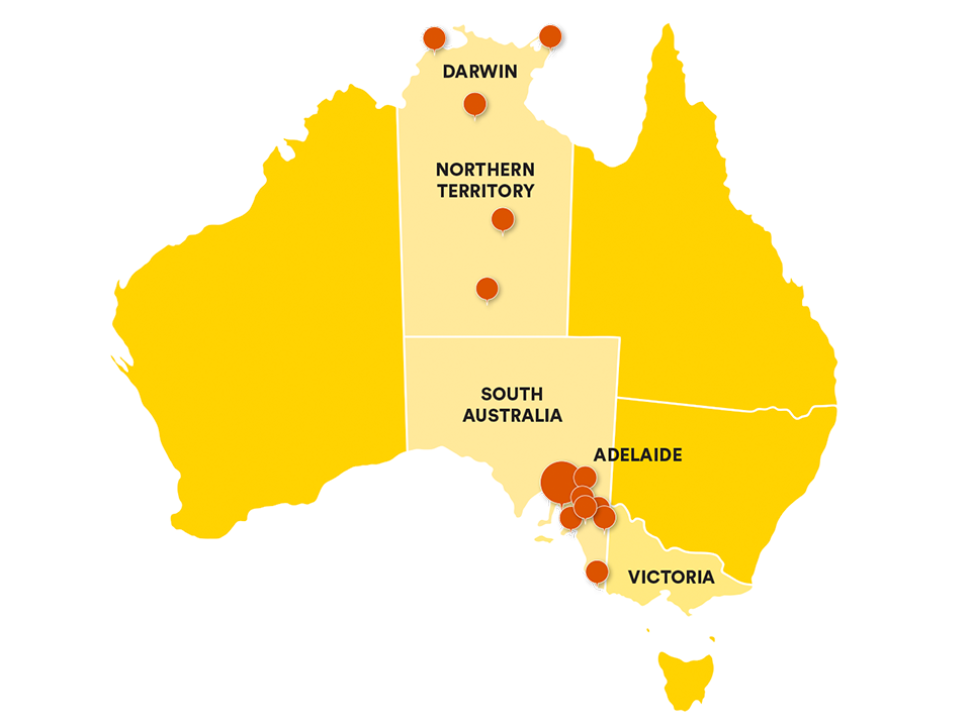
Familiarise yourself with the campuses you’ll be attending at this link – https://www.flinders.edu.au/campus. Each of the Flinders campuses have their own quirks. When I was studying here at Flinders (back in the early 2000’s), Bedford Park was the main attraction, but now we have Festival Plaza, Tonsley, Northern Territory and many rural and remote sites. Flinders has a presence right through the middle of Australia!
The other big part of your university experience will be getting to know the various digital services you’ll use along the way, like the student website, Flinders Learning Online (FLO – you’ll also hear people call it Canvas based on the underlying software) and Okta/ Flinders Dashboard.
Start here: https://students.flinders.edu.au/ – Once logged in (FAN and password – FAN will look something like jovh0085), this site provides a comprehensive overview of the various things you need to know as a Flinders student. From here you can learn about all the other digital spaces you’ll use during your time as a student. Set aside time to read as much of that site as you can.

In addition to key websites and platforms, you will also likely use some digital tools whilst you are a student. Christine, one of the Disability Advisors recommended installing and familiarising yourself with the Everyway tools (Read & Write) before topics ramp up. Read & Write is a literacy support tool that helps students improve their reading, writing, and comprehension. It features text-to-speech, speech to text, and screen masking, ideal tools for students with learning differences like dyslexia or those who speak English as an additional language. Students at Flinders University can access Read & Write on all student computers within Learning and Teaching areas as well as installing on personal devices. For setup instructions and support, visit here. Check out what student Laura had to say about Read & Write.
🟢 In terms of getting to know how a university works, good skills to develop, common barriers that students experience and what support services are available to you, the Finding Your Way At Flinders topic is great. The topic both introduces you to university life, but also gets you familiar with the learning management system (FLO/Canvas) that contain all your course materials.
Finally, be patient with yourself as you learn your way around. Don’t be afraid to ask someone on campus. In my experience 90%+ of people want to help. The other 10% are probably as lost as you are and would appreciate running into a fellow traveller 😂.

Now I am mindful that email can be a pain, and most of us are swimming in excess emails, but I strongly recommend trying to read all the emails you get from Flinders, at least in the first few months 📧
Email is still a dominant communication platform in academia and much of what you might need to know will still be sent via email. It isn’t just information about your specific degree. It will be content about everything else that is happening at Flinders.
🟢 Maybe set aside a couple of times each day to look through your Flinders emails ⏳
Section reflection 🤔
For those of your studying on campus, have you visited that campus yet? What did you think of it? Were you able to find your way around?
For online students, how are you feeling about interacting with your degree entirely online? If you are wondering what supports are available to you, visit this page.
Getting Off to a Good Start Guide
✨ Explore the sections:
🔗 Introduction |
🔗 Know Your Way Around |
🔗 Start Your Studies Well |
🔗 Looking After Yourself |
🔗 Your Support System |
🔗 Further Reading |
🔗 Final Words
